


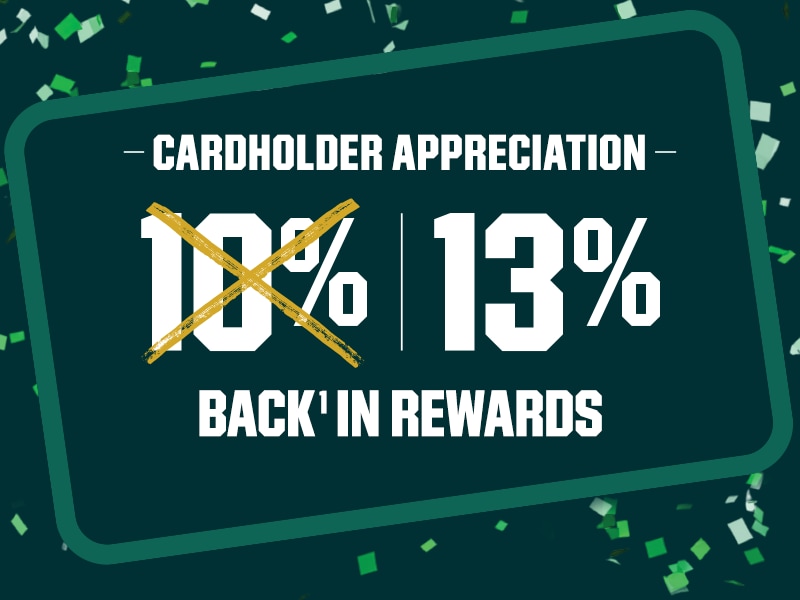
Earn 13% Back¹ in Rewards on Qualifying Purchases at Our Brands
Instead of the everyday 10% Back¹ in Rewards benefit. Valid 9/24/26–9/27/26.
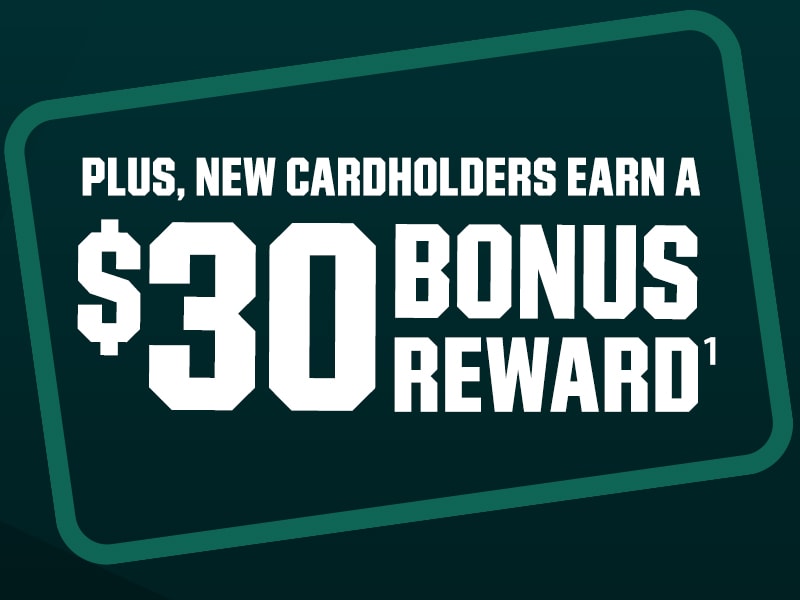
Plus, new Cardholders earn a $30 Bonus Reward¹ after you open and use a DICK’S Credit Card
¹Subject to credit approval. ScoreCard account required to apply and earn Points. For exclusions & details see Teammate or visit DICKS.com/ScoreCardTerms.
13% BACK IN REWARDS: Offer valid 9/24/26 - 9/27/26 in lieu of everyday 10% Back in Rewards offer. 13% back provided in ScoreCard Points. Except for special financing purchases, Cardholders earn at least 3 ScoreCard Points for every $1.00 spent on qualified purchases at our stores when paying with a DICK’S Credit Card or DICK’S Mastercard®. REWARDS GIVEN IN $10 INCREMENTS. 300 POINTS = $10 REWARD. Terms apply, see Teammate or DICKS.com/ScoreCardTerms.
10% BACK IN REWARDS: 10% back provided in ScoreCard Points. Except for special financing purchases, Cardholders earn at least 3 ScoreCard Points for every $1.00 spent on qualified purchases at our stores when paying with their DICK’S Credit Card or DICK’S Mastercard®. REWARDS GIVEN IN $10 INCREMENTS. 300 POINTS = $10 REWARD.
$30 BONUS REWARD: Qualifying purchase must be made on day approved. Limit one offer per account. Bonus Reward issued within 60 days after account opening. Applicants who do not receive a credit decision the same day that they apply, but are later approved, will receive a $30 Bonus Reward offer in their credit card package. Coupon required in-store to redeem.
Mastercard and the circles design are registered trademarks of Mastercard International Incorporated.
Terms capitalized and not defined are defined in the ScoreCard Terms and Conditions.
ScoreCard is a free loyalty program that lets members earn Points on qualifying purchases and activities, receive personalized offers, exclusive access to products and promotions, and redeem Points for Rewards.
U.S. residents (including territories) age 13 or older with a valid email address and mobile phone number for who intend to use the program for personal, non-resale use.
No. Enrollment in ScoreCard is free, though a purchase or fee may be required to achieve certain benefits or status.
You can earn Points and redeem Rewards online and in-store at DICK’S Sporting Goods, Golf Galaxy, Public Lands, and Going, Going, Gone!
You can enroll in‑store, online, or through the DICK’S or Golf Galaxy mobile apps.
No. Each person may only have one ScoreCard account
No. Accounts, Points, Rewards, and benefits are non‑transferable.
We need a valid email address to deliver Rewards, loyalty offers, and other program-related information.
Points are earned through qualifying purchases at our stores, fitness activities when enrolled in MOVE via the DICK’S mobile app, eligible DICK’S Credit Card purchases, and special promotions. See complete ScoreCard Terms and Conditions for details.
Qualified purchases are merchandise purchases in our stores and in-store services and experiences. Qualified purchased do not include items such as gift cards, taxes, voluntary fees to join elevated tiers of ScoreCard membership, shipping, returns, and certain brands and services.
Yes. All Points that have not been converted to a ScoreCard Reward will expire one year from the date on which the Points are earned.
If your ScoreCard was not used in-store and you have your receipt, you can credit the purchase to your account within 90 days. Simply log in to My Account on DICKS.com and select “Credit Account” under My Points History and follow the instructions. Always keep your receipts for verification in the event of a discrepancy.
To receive an electronic receipt of your in-store purchase, you must have a valid email address on your ScoreCard account. You will be asked at checkout if you would like to receive an electronic receipt.
To add or update your email address yourself, log in to My Account on DICKS.com and select Account Settings.
The most common reason for a negative Points balance is merchandise being returned after your Points converted into a Reward. If you believe there is an error on your account, please contact the ScoreCard Hotline at 1-800-440-4002.
Points are converted into Rewards at a rate of 300 Points = $10. You will automatically be issued a $10 Reward when your Points balance reaches 300 Points. Rewards are issued in $5 increments beginning at $10. Occasionally, we may offer you the option to redeem Rewards in other increments.
Yes. Rewards are capped at $500 per calendar month.
Rewards expire 90 days after the date they are issued
Rewards are delivered within 30 days of qualifying for a Reward. You can view and redeem available Rewards in your account online or on the DICK’S or Golf Galaxy Mobile Apps. Available Rewards can also be redeemed in store when you provide your ScoreCard at checkout. You will be notified that a Reward is available via email.
No. Rewards have no cash value and cannot be transferred or exchanged for cash. A Reward must be used in a single transaction. If your purchase total is less than the Reward amount, you lose the remaining balance.
Returns will be reduced by the portion of the Reward applied to the returned item. When a Reward is used on a transaction with several items, the Reward is applied to each item proportionate to the item’s value compared to the total transaction value. Points equal to the portion of the Reward allocated to the returned item will be added back to your account.
Rewards are not available immediately due to the processing time associated with issuing the Reward. You can see when your Points convert into a Reward by logging in and visiting the My Points section under My Account.
Yes. The Points you earned from purchasing the returned item are deducted from your account when you complete a return. You must present your ScoreCard at the time of the return.
You can achieve ScoreCard Gold status by either (A) using your DICK’S Credit Card or DICK’S Mastercard® to make a purchase in our Stores at least once during the calendar year or (B) making five hundred dollars ($500) in qualified purchases during the calendar year. For additional details, please see the ScoreCard Terms and Conditions.
Gold status unlocks access to Gold member-only perks, including a 3x Points offer to use on any single purchase once per calendar year, and one (1) $10 Bonus Reward each year you retain Gold status.
When you achieve Gold status, you’ll keep that status for the remainder of the current calendar year through the end of the following calendar year.
You can always check your status by logging in to My Account at DICKS.com/ScoreCard.
ScoreCard+ is DICK’S Sporting Goods paid membership program designed to deliver even more value. For an annual fee (currently $99), members receive benefits that go beyond our free ScoreCard program.
As a ScoreCard+ member, you’ll enjoy annual Bonus Rewards, free shipping, an annual 3x Points day, discounts on services and experiences, and an annual free service or experience. Visit the ScoreCard+ program page for details.
To join ScoreCard+, you must first be enrolled in ScoreCard, our free loyalty program. Once you’re a ScoreCard member, you can upgrade to ScoreCard+ membership at any time on DICK’S.com/ScoreCard or in the DICK’S and Golf Galaxy apps.
ScoreCard+ is a US-based paid premium loyalty program open to active ScoreCard members with a valid credit or debit card.
ScoreCard+ annual membership fee is currently $99. Memberships auto-renew annually at the then-current annual rate as communicated to you prior to renewal. You may cancel auto-renewal at any time in My Account.
No. ScoreCard+ membership fees are non-refundable. If you cancel auto-renewal then your ScoreCard+ benefits and membership status will be available to you until the end of your current membership period.
You can cancel auto-renewal at any time by following the steps below.
1. Sign in to DICK’S.com or app and visit My Account
2. Navigate to Manage Membership Tab
3. Toggle auto-renew to “off”
4. Confirm your action
At this point, your renewal status will be reflected as “off” in your account, and you will continue to receive ScoreCard+ benefits until the end of your current subscription period. ScoreCard+ membership fees are non-refundable.
Benefits will be available within minutes of your ScoreCard+ membership purchase and will be available to apply to your next purchase.
No changes there! You will continue to earn 1 point for every $1 spent on qualifying purchases at our family of brands, or at the rate appliable to your membership tier. ScoreCard+ is a way to level up your membership with additional benefits and perks.
You will receive your $100 annual Bonus Rewards as four $25 Bonus Rewards issued every three months. Your first $25 Bonus Reward will be available in your account to use in-store or online within minutes of the purchase of your ScoreCard+ membership. Your three subsequent $25 Bonus Rewards are automatically issued once every three months (about every 90 days) after your ScoreCard+ enrollment date. You’ll receive an email notification when each Bonus Reward is ready to use. Each Reward will expire 90 days after it is issued. You can see all of your active, used, and upcoming Rewards within My Account, as well as their expiration dates.
ScoreCard is free to join by creating an account online or in-store. ScoreCard+ is a paid premium annual membership program that includes all ScoreCard benefits, including ScoreCard Gold benefits when Gold Tier status is earned, plus additional premium benefits that allow you to unlock more perks and Rewards.
Yes! ScoreCard+ members are still eligible to earn Gold Tier status. However, ScoreCard+ annual membership fees do not count towards ScoreCard Gold membership tier progress and Rewards cannot be used to pay for the ScoreCard+ annual membership fee.
Your ScoreCard+ membership will auto-renew annually at the then-current rate (currently $99/yr), unless you cancel auto-renewal. The annual fee will be charged to the credit or debit card saved in your account. To renew your membership, you must have a valid credit or debit card saved to your account.
Once enrolled, you’ll receive a confirmation email and receipt of purchase within minutes. Your account will reflect your ScoreCard+ status at that time, and you may begin to enjoy your benefits. You’ll also start receiving communications about your membership benefits.
Only credit and debit cards can be used to purchase ScoreCard+ membership. Rewards cannot be used to pay for the ScoreCard+ annual membership fee.
To remove your saved payment on file, visit My Account or do so when placing a new online order.
Currently, you may only add a new payment method when placing a new order. The ability to add a new payment method in My Account is coming soon.
Please reach out to the ScoreCard+ Dedicated Customer Service Line at (866) 313-6777.
Your ScoreCard+ benefits can apply to both in-store and online purchases, as long as you are signed in online or provide your ScoreCard at checkout in-store.
Free shipping will automatically apply to qualifying products online for applicable standard shipping orders when signed in. Free shipping benefit is not available at Going, Going, Gone!
Your 20% off Services and Experiences and 1 Free Service or Experience benefits are redeemable in-store only.
To redeem your 3X Points offer online, log-in to your ScoreCard account and navigate to Account to apply the offer. To redeem in-store, ask an associate to access your ScoreCard account at checkout where they can find and apply your 3X points offer. Only one Point multiplier offer can be used on a given transaction.
Simply present your 1 Free Service or Experience coupon or ask an associate to apply it at checkout to redeem. This benefit can be used once per year on a service or experience up to $100 in value. Most services and experiences are available to reserve in advance on DICKS.com.
Your 20% discount will be automatically applied when you provide your ScoreCard email to the teammate at checkout in-store.
Services and experiences up to $100 in value are eligible for the 1 Free Service or Experience benefit. This benefit may be redeemed once per year. Services and experiences may not be offered in all of our stores and are subject to availability.
Yes. Your 1 Free Service or Experience benefit covers the full cost of a single, regular price service or experience valued up to $100. It is a one-time use benefit per year and therefore cannot be split across multiple services or experiences (for example, two $50 services). If you choose a service or experience priced above $100, the benefit cannot be applied toward the total and the remaining balance cannot be paid separately. Services and experiences priced above $100 could still qualify for the 20% discount for ScoreCard+ members.
Yes, special events and private rentals are not eligible for the 20% discount. Service and experience availability varies by location and are available on a first come, first served basis.
Yes. Accounts may be closed for inactivity, misuse, or violation of program terms. An account may be closed for inactivity if no Points are earned through qualified purchases for in the past 12 months.
Yes. The program, including its benefits and rules, may be modified or discontinued at any time in accordance with the ScoreCard Terms & Conditions. If required by law, we will provide notice by electronic means including by posting notice of changes to dicks.com/scorecard.
The complete ScoreCard Terms & Conditions are available online and apply to all program participation.
For questions regarding your ScoreCard account, contact customer service at 1-800-440-4002. For questions regarding your ScoreCard Gold account, contact customer service at 1-833-679-9638.For questions regarding your ScoreCard+ account, contact customer service at 866-313-6777.
You can earn 3 Points daily by completing one of the following daily activity challenges:
You must complete the challenge in one (1) calendar day (measured in ET) in order to earn Points. Each day your activity will reset back to zero (0). Your progress towards daily activity challenges is based on the activities reported to the MOVE fitness tracker by your connected fitness device. Note, if you have duplicate activities reported by more than one connected fitness tracker, then only the highest reported activity will count towards your daily activity challenge progress.
Points are typically awarded within a few hours of completing the daily challenge. Please wait for 24 hours as sometimes there may be a delay in processing.
If you are still experiencing an issue after 24 hours, then contact us by selecting Support & Feedback in the app menu. Be sure to include your ScoreCard number, date missed, the tracker you are using (e.g., Fitbit, Garmin, etc.).
There are two common reasons this may happen.
First, you may have more than one fitness tracker connected to MOVE. If multiple trackers report activity, MOVE will only record the activity with the highest total, or the most progress toward a daily challenge. Activity from different trackers cannot be combined.
Second, the MOVE app may not have received data from your fitness tracker. There could be multiple reasons:
Here are a few steps you can take to troubleshoot and fix:
1. Verify your tracker is connected to the app.
2. From the MOVE home screen, scroll down to “My Trackers” to ensure the tracker is in the connected state.
3. Go to your fitness tracker app or online portal and ensure your physical tracker is synced with the app or portal.
4. If the portal is out of sync with your physical tracker, then sync and come back to the DICK’S Sporting Goods app to verify your activity has posted. Give a few minutes for your activity data to transfer to the app.
5. If you are using Apple Health, make sure you have granted permission for activity to be shared with app.
6. If you followed the above steps and are still not seeing your data update, you need to disconnect your tracker and reconnect to the app.
7. If none of the steps above resolve the issue, contact us through Support & Feedback within the app. Be sure to include your ScoreCard number, affected date and time, and tracker you are using (e.g., Fitbit, Garmin, Apple Health, MapMyRun, etc.).
Apple Health requires permission for each activity type in order to share your data with DICK’S Sporting Goods. You can verify the right permissions are enabled by going to the Apple Health app and navigating to Sources → Dick’s. Check that you are allowing DICK’S Sporting Goods to read the data for each of your preferred activities. If not, go ahead and give permission by toggling to green for each activity you want to sync with MOVE. If you are still experiencing an issue, please contact us by reporting a problem at Support & Feedback in the app menu. Be sure to include as much information as possible.
To support activity tracking and rewards, MOVE stores a limited set of activity data from your connected fitness tracker, including steps, distance, total exercise time, and activity type. MOVE does not collect or store sensitive health data or detailed biometric information. You can manage or disconnect your fitness tracker permissions at any time within the app.
This happens when you have more than one ScoreCard account. Keep in mind that only one tracker is allowed to be connected to one ScoreCard account at a time.